
Products
NAVOO Digital Guide
Your property
Prices
Manage devices and automations from a single control panel
The NAVOO Console is the control panel where you configure and manage Smart Controller.
Connect your smart devices, link your PMS and create automations in just a few minutes, with no technical expertise required.
Everything you need is already included
The NAVOO Console brings together all the essential features in a single control panel, with no installation required.
Multiple properties
Manage multiple hotels, B&Bs, apartments and properties from a single control panel.
- Try the demo and create your first property directly from the control panel
- Assign each room or unit to its NAVOO device
- Manage different user roles for each staff member
Shelly devices
Connect smart devices and link them to rooms or properties.
- Choose which devices to control with Smart Controller
- Custom automation systems for every property
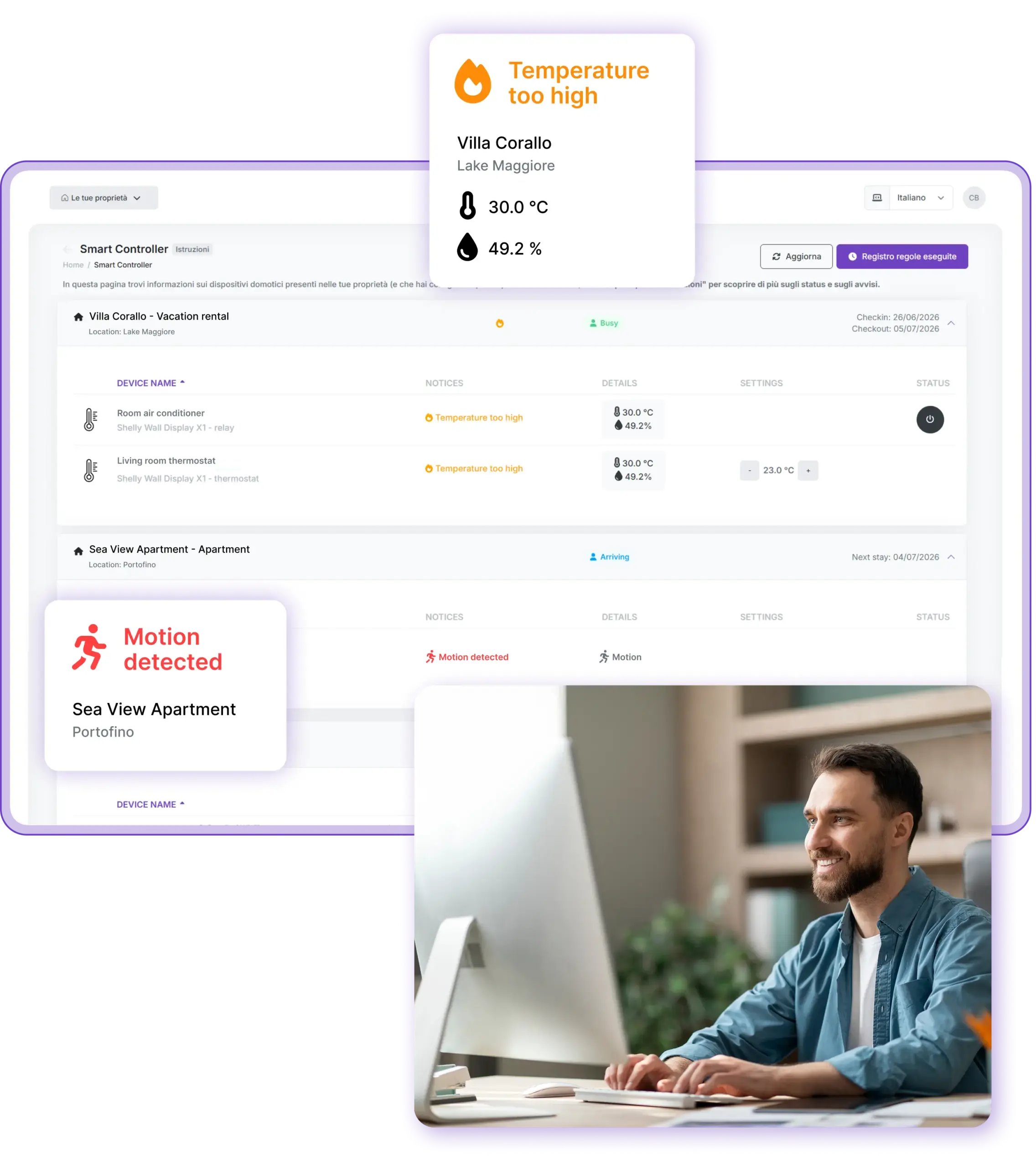
- All information summarized on a single page, in real time
PMS connection
Import stay information and activate automations.
- Connect the PMS used by each property
- Check-in and check-out dates update automatically
- Targeted checks and alerts based on the stay status
What changes when Smart Controller is connected to the PMS
Automations work for you: reservation data triggers the right actions on your smart devices.
Less work, fewer mistakes
Reservations are managed exclusively through the PMS, which remains the central and sole source of information regarding stays.
Data updated automatically
Check-in and check-out dates, along with useful stay information, are automatically synced with the NAVOO Console.
All information summarized
On a single page, you can view information about current and upcoming stays, along with details about each smart device.
Check and take action only when needed
At a glance, you can see whether all devices are set up correctly and change the settings with a single click if needed.
Setting up Smart Controller is easier than you think
Enable the required integrations
Follow the guide to connect the Shelly devices installed at your property and link your PMS in the NAVOO Console.
Create your automatic rules
Decide which devices should turn on, turn off or adjust based on check-in and check-out times.
Monitor everything and relax
Smart Controller automatically manages your smart devices and notifies you of any issues.
Enable the necessary integrations
Follow the guide to connect the Shelly devices installed at your property and to link your PMS in the NAVOO Console.
Create your automatic rules
Decide which devices should turn on, turn off or adjust based on check-in and check-out times.
Monitor everything and relax
Smart Controller automatically manages your smart devices and notifies you of any issues.
Integrates with leading PMS systems
You can connect your PMS on your own, without assistance from NAVOO.
Opera Cloud
MEWS
Guest Wisely
5 Stelle
Hotel Cube
Alyante
Slope
Kalisi
WuBook
Lodgify
Team System Hospitality
Guesty
Can’t find your PMS?
Write to us and we’ll contact your provider to create the integration.
Do you have any questions?
Do you need technical assistance to set up Smart Controller?
No! The setup is guided and very simple. You’ll be able to do everything on your own from the NAVOO Console, without any technical expertise.
What happens if I modify a reservation in the PMS?
Changes are automatically imported into the NAVOO Console without any manual intervention. The rules for configuring and controlling home automation devices will always be executed automatically at the correct time.
Can I use Smart Controller without a PMS?
Yes. You can manage home automation devices and automations even without a connection to your PMS. You can enter reservations manually directly in the NAVOO Console.
Can you add my PMS to the list of compatible systems?
If your PMS isn’t among those already available, please let us know! We’ll contact your PMS provider to see if we can integrate with it.
How much does it cost to use the NAVOO Console?
The NAVOO Console is free to use. You’ll need to activate your monthly Smart Controller subscription to ensure that device management rules are executed automatically.
Still have questions? We’ll answer them all.
Start automatically managing your Shelly devices and keep everything under control in the NAVOO Console.
- No initial activation fee
- Configure and update with just a few clicks
- Flexible monthly subscription: pause and reactivate it at any time